


Ask your onX Hunt questions here!

I’ve tried selecting say 50+ way points at once to delete. We weren’t able to do it. Had to do it one by one.
You should be able to go into My Content> Click Select>Choose Waypoints to Delete> Click Delete Button. If that process does not work on your end, please send us an email or give us a call and we can help you get those waypoints deleted. Our email is [email protected] and our phone number is (406) 540-1600.
 
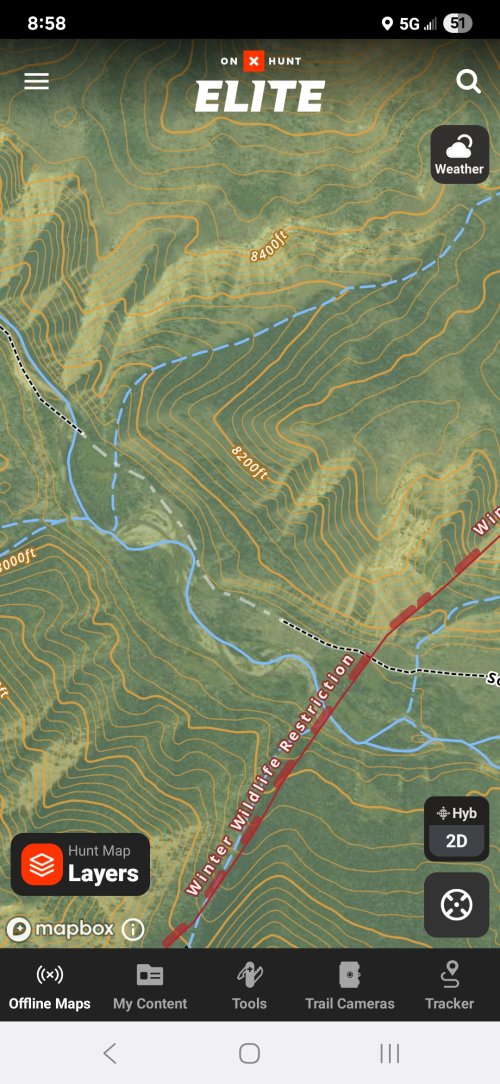
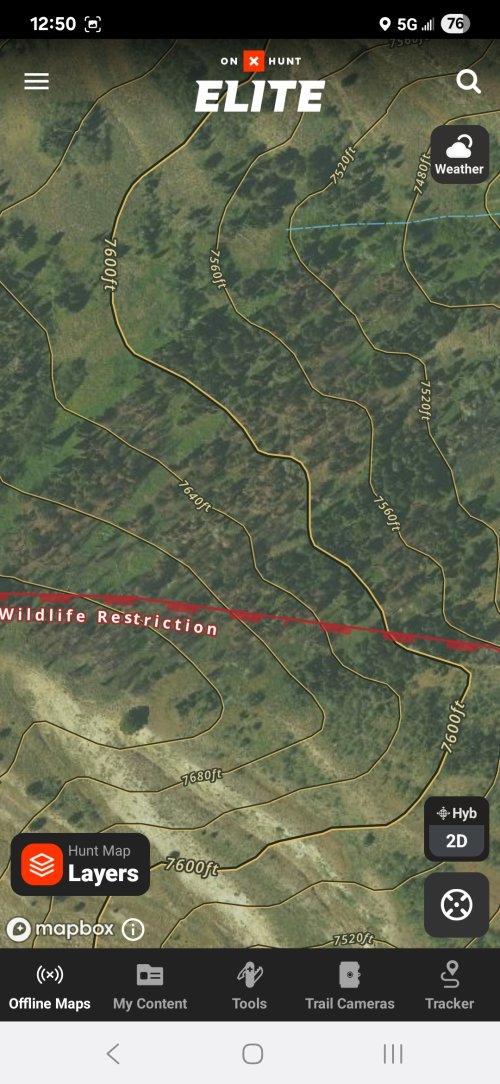
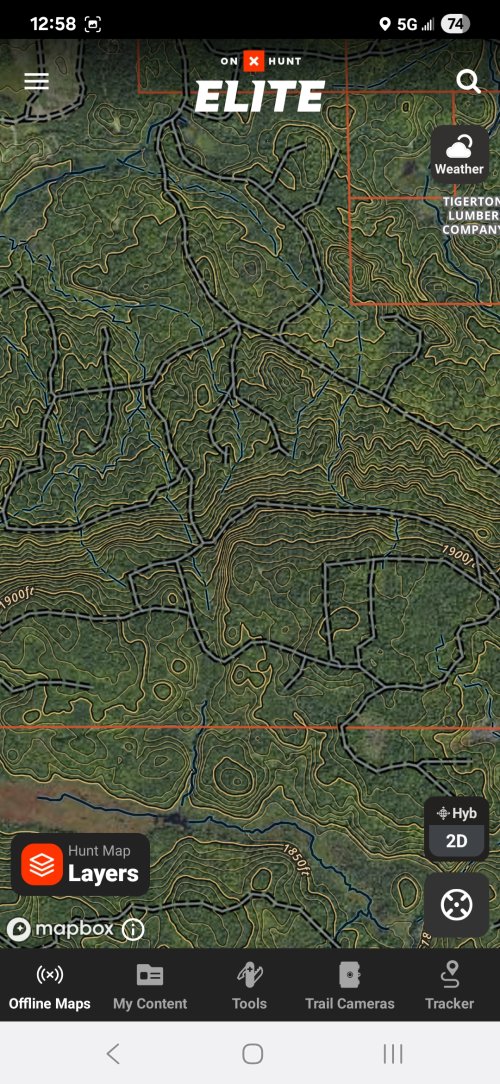
Im not sure if its because of a phone update or an Onx update, but on my android, the Topo lines now have a yellow line AND a black line going through them and its making the maps look REALLY messy when you zoom out any distance. I checked the settings and couldn't see how to adjust the color or lines for the topo lines?

Old picture first:
1000009674.jpg


1000009765.jpg


It just feels really messy and off putting to use 🤷‍♂️

1000009767.jpg
 
How large of an area can I realistically save as a offline map and still retain pretty good quality?
I've got about an 80 mile x 80 mile square that I do quite a bit of my recreating on.
ps - would try it myself on the Galaxy Tab a9 but I don' have it in my possession as I write this
 
How large of an area can I realistically save as a offline map and still retain pretty good quality?
I've got about an 80 mile x 80 mile square that I do quite a bit of my recreating on.
ps - would try it myself on the Galaxy Tab a9 but I don' have it in my possession as I write this
The Medium Detail maps are probably going to be your best bet. The image quality is slightly less than the High Detail maps, but you're able to save a much bigger area. The exact dimensions will vary based on your device and screen dimensions, but the largest medium detail map you can currently save will be about 35 miles east to west by 50 miles north to south. If you need to save a larger area, you can save multiple maps in a grid pattern to cover the area you need.
 
Im not sure if its because of a phone update or an Onx update, but on my android, the Topo lines now have a yellow line AND a black line going through them and its making the maps look REALLY messy when you zoom out any distance. I checked the settings and couldn't see how to adjust the color or lines for the topo lines?

Old picture first:
View attachment 380810


View attachment 380811


It just feels really messy and off putting to use 🤷‍♂️

View attachment 380812
That is a new style that we recently released for the hybrid basemap. I can see what you mean about it being a little messy in your area. I'll pass your feedback along to our mapping team to see if they can make some adjustments to make that map look a little bit cleaner.
 
How large of an area can I realistically save as a offline map and still retain pretty good quality?
I've got about an 80 mile x 80 mile square that I do quite a bit of my recreating on.
ps - would try it myself on the Galaxy Tab a9 but I don' have it in my possession as I write this

I download several complete hunt units every year, 5 mile hi res maps, no issue with an Iphone.
 
Im not sure if its because of a phone update or an Onx update, but on my android, the Topo lines now have a yellow line AND a black line going through them and its making the maps look REALLY messy when you zoom out any distance. I checked the settings and couldn't see how to adjust the color or lines for the topo lines?

Old picture first:
View attachment 380810


View attachment 380811


It just feels really messy and off putting to use 🤷‍♂️

View attachment 380812
Absolutely the same issue for me. I really prefer the old imagery vs the new more “cartoon” look
 
Absolutely the same issue for me. I really prefer the old imagery vs the new more “cartoon” look
Yeah, I had to open up the gohunt maps after not using it for 2 years just to make sure I really like onx better. Its getting close to just saying "so long" to onx if it keeps heading this direction.
 
That is a new style that we recently released for the hybrid basemap. I can see what you mean about it being a little messy in your area. I'll pass your feedback along to our mapping team to see if they can make some adjustments to make that map look a little bit cleaner.
Im always curious when a company makes a change to a product that seems to only be for change sake. @onX Hunt , what did this change do to improve the product?
 
Im always curious when a company makes a change to a product that seems to only be for change sake. @onX Hunt , what did this change do to improve the product?
Here’s some context behind the update:
  • Improved Visibility Across Terrain Types: The previous contour styling, while familiar, often blended into the aerial imagery—especially in some densely forested areas, snow-covered terrain, or low-contrast imagery. This made it hard to read elevation and terrain clearly at certain zoom levels.
  • New Dual-Line Styling: The new style uses a subtle double-line technique with carefully tuned light and dark strokes. This helps contours stand out regardless of the background—whether you’re looking at dark timber, snow, or bare ground—without overpowering the aerial imagery. It was designed specifically to balance legibility with preserving image detail.
  • Less Visual Noise at Critical Zooms: The older style could make the map feel cluttered or overly busy at mid-zoom levels. The updated approach aims to preserve contour utility while reducing visual overload so you can see both terrain and imagery clearly during planning or in-field use.
  • Data Improvements as Well: With this visual update, we also upgraded the underlying contour data. This includes variable intervals depending on terrain: some areas now show 10’, 20’, or 40’ spacing based on the source data. This may make some areas appear more “dense” with contours than before.
 
Here’s some context behind the update:
  • Improved Visibility Across Terrain Types: The previous contour styling, while familiar, often blended into the aerial imagery—especially in some densely forested areas, snow-covered terrain, or low-contrast imagery. This made it hard to read elevation and terrain clearly at certain zoom levels.
  • New Dual-Line Styling: The new style uses a subtle double-line technique with carefully tuned light and dark strokes. This helps contours stand out regardless of the background—whether you’re looking at dark timber, snow, or bare ground—without overpowering the aerial imagery. It was designed specifically to balance legibility with preserving image detail.
  • Less Visual Noise at Critical Zooms: The older style could make the map feel cluttered or overly busy at mid-zoom levels. The updated approach aims to preserve contour utility while reducing visual overload so you can see both terrain and imagery clearly during planning or in-field use.
  • Data Improvements as Well: With this visual update, we also upgraded the underlying contour data. This includes variable intervals depending on terrain: some areas now show 10’, 20’, or 40’ spacing based on the source data. This may make some areas appear more “dense” with contours than before.
Thank you so much for the detailed response! I'd say, from my perspective, it did the opposite of all of those things. It made it more difficult to see the layers, made the images more noisy, and the variable contours never really offer any relief to the noise by zooming in or out in sn attempt to see better. YMMV
 
The Medium Detail maps are probably going to be your best bet. The image quality is slightly less than the High Detail maps, but you're able to save a much bigger area. The exact dimensions will vary based on your device and screen dimensions, but the largest medium detail map you can currently save will be about 35 miles east to west by 50 miles north to south. If you need to save a larger area, you can save multiple maps in a grid pattern to cover the area you need.
On my desktop PC, using "medium' detail quality, it is only allowing 25.1 miles east-to-west and 32.3 miles north-to-south
Is there a way to alter the dimensions of the map grid. 35 mi. e/w and 50 mi. n/s would be perfect for me
 
On my desktop PC, using "medium' detail quality, it is only allowing 25.1 miles east-to-west and 32.3 miles north-to-south
Is there a way to alter the dimensions of the map grid. 35 mi. e/w and 50 mi. n/s would be perfect for me

Nope, zoom in/out and what you see is it. Just do multiple hi res maps. I've had over 100 hi res maps on the phone at one time.
 
On my desktop PC, using "medium' detail quality, it is only allowing 25.1 miles east-to-west and 32.3 miles north-to-south
Is there a way to alter the dimensions of the map grid. 35 mi. e/w and 50 mi. n/s would be perfect for me
At this time, the length/width ratio on the Web Map is fixed. Like WapitiBob said, to cover a bigger area, you'll just need to save a few maps in a grid pattern to cover the larger area. Alternatively, you could try saving on your mobile device. The length/width dimensions are different depending on the device you are on, so you may get slightly larger maps on a mobile device.
 
Ok, so the 25.1 mi X 35.3 mi medium detail grids will be fine.

Next question - let's say i've got four of the 25.1 mi x 35.3 mi grids as my offline maps (we'll consider each one NW, NE, SW & SE) Using OnX as a GPS, if I'm driving down the road through the NW grid and drive into the NE grid, will OnX pick this up and automatically switch screen to the NE grid, or do I have to do that manually>? PS: I've overlapped each grid by a little and maybe better way to ask this question is "does my location 'flow' seamlessly from map grid to map grid"? SCRATCH THIS INQUIRY...being that I'm located in one corner of a map grid, I got in the truck and drove a couple miles down the road into another offline map grid. My gps location seamlessly transitioned from one grid to another
 
Last edited:
Nope, zoom in/out and what you see is it. Just do multiple hi res maps. I've had over 100 hi res maps on the phone at one time.
yep, that's what I'll do. I had laid out 20 of the medium detail grids and still had tons of gb's left

to make the job easier, I laid out the offline maps on my desktop PC conventional style with keyboard and mouse and when I logged in with my Galaxy Tab A9, it automatically downloaded the Maps
 
Last edited:

Latest posts

Forum statistics

Threads
117,716
Messages
2,165,952
Members
38,329
Latest member
Gerber Gear
Back
Top