There's definitely someone more qualified to answer this better than me but its possible it was an Early Beta test option for their latest update or its under HD TopoThis is the same for me



Navigation
Install the app
How to install the app on iOS
Follow along with the video below to see how to install our site as a web app on your home screen.
Note: This feature may not be available in some browsers.
More options

You are using an out of date browser. It may not display this or other websites correctly.
You should upgrade or use an alternative browser.
You should upgrade or use an alternative browser.
Ask your onX Hunt questions here!
- Thread starter Big Fin
- Start date
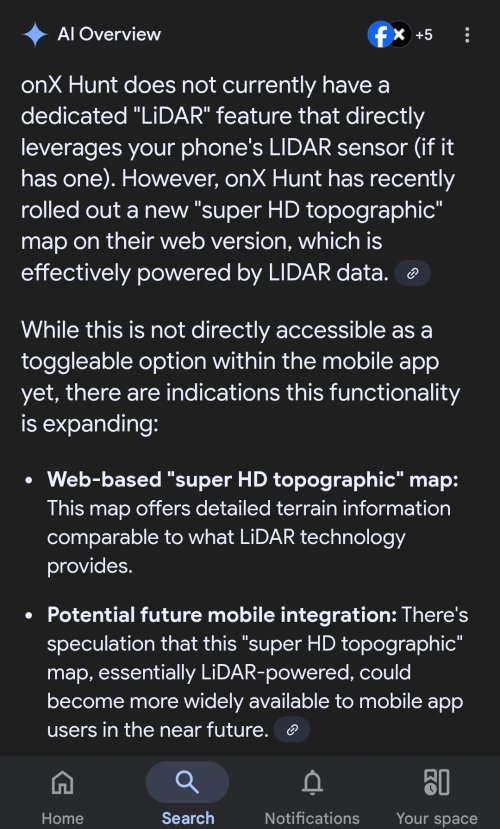
There's definitely someone more qualified to answer this better than me but its possible it was an Early Beta test option for their latest update or its under HD Topo
Attachments
kwyeewyk
Well-known member
I've never had this problem with android, if I completely close the app or phone battery dies it will ask if I want to resume or discard the track and then it draws a straight line, but if I just minimize the app and or lock the screen it always maintains the detailed track for me.Every android/onx phone I have hunted around has stopped tracking when onx is in the background, then it resumes with a straight line to the current location when the app is back in the foreground.
birdseye
Active member
as I mentioned earlier, I have many, many waypoints with a color designated for each species. When I transferred them over to OnX Hunt, it designated all symbols with the default Red. Currently there is no method to 'back shade' or 'mass check off' to sort out a bunch of waypoints for a mass edit
It's tedious to click on each waypoint and make the change. I noticed that you can go into Waypoint File and "check box" a waypoint (or several), to delete or share each one. Could the OnX techs add a "mass edit" check box? For example, all of my mule deer waypoints, I could go down the list and check mark them, then in one stroke change the waypoint color. THNX
It's tedious to click on each waypoint and make the change. I noticed that you can go into Waypoint File and "check box" a waypoint (or several), to delete or share each one. Could the OnX techs add a "mass edit" check box? For example, all of my mule deer waypoints, I could go down the list and check mark them, then in one stroke change the waypoint color. THNX

Khunter
Well-known member
It is a little easier with the Onx web map instead of in then app on a phone. Might at least try that.as I mentioned earlier, I have many, many waypoints with a color designated for each species. When I transferred them over to OnX Hunt, it designated all symbols with the default Red. Currently there is no method to 'back shade' or 'mass check off' to sort out a bunch of waypoints for a mass edit
It's tedious to click on each waypoint and make the change. I noticed that you can go into Waypoint File and "check box" a waypoint (or several), to delete or share each one. Could the OnX techs add a "mass edit" check box? For example, all of my mule deer waypoints, I could go down the list and check mark them, then in one stroke change the waypoint color. THNX
Your import issue goes then other way as well, when I port Onx color coded and custom symbols waypoints tracks to gaia etc, some deal, all looks the same.

onX Hunt
Active member
- Joined
- Jul 22, 2013
- Messages
- 495
We hear you, and we absolutely see how that could be useful at times, but right now our focus is on developing features for the Mobile App for in field use, and Web Map features for at home use. At this time, offline maps for the Web Map is not on our development roadmapstill waiting for desktop offline maps
It would be a lot easier to download onx offline maps for my laptop vs using a developer hack so I can download google earth imagery for offline use when I'm in hunting camp. It would almost make onx a complete e-scouting solution; missing only the ability to import geo referenced pdf/kml/kmz/geotiff overlays.
onX Hunt
Active member
- Joined
- Jul 22, 2013
- Messages
- 495
That would definitely be a helpful feature when editing a large number of points. We will pass your request along to our engineering team!as I mentioned earlier, I have many, many waypoints with a color designated for each species. When I transferred them over to OnX Hunt, it designated all symbols with the default Red. Currently there is no method to 'back shade' or 'mass check off' to sort out a bunch of waypoints for a mass edit
It's tedious to click on each waypoint and make the change. I noticed that you can go into Waypoint File and "check box" a waypoint (or several), to delete or share each one. Could the OnX techs add a "mass edit" check box? For example, all of my mule deer waypoints, I could go down the list and check mark them, then in one stroke change the waypoint color. THNX
onX Hunt
Active member
- Joined
- Jul 22, 2013
- Messages
- 495
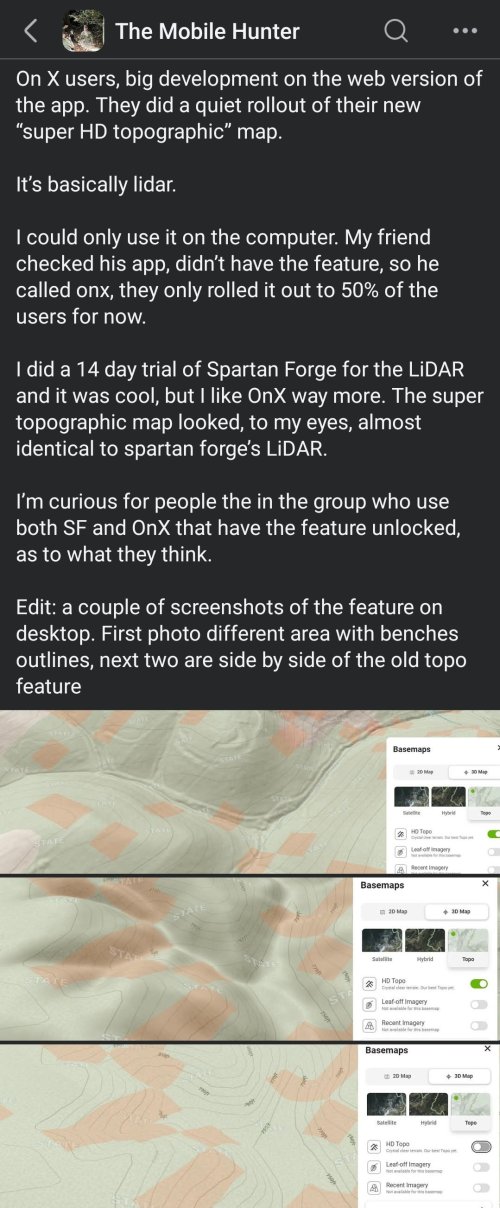
Lidar has been released on both iOS and Android. If you are not seeing it on your end, please make sure you are on the most up to date version of the App.This is the same for me
birdseye
Active member
Another argument for having a +/- zoom "Button" function on the OnX Hunt app: When using the app as a GPS mounted in your vehicle while driving, it's very distracting (and dangerous) to be doing the 2-finger "sweep" if you want to zoom in/out on the move...the screen gets smudged up and after the 2-finger sweep, you must push that little button to re-center your position. The present zoom method takes your eyes off the road and a +/- feature would make usage a lot simpler and safer
Last edited:
birdseye
Active member
A few more suggestions: I've been using a Garmin Nuvi w/OnX Hunt Map chip when on the road. When I'm foot, I use Garmin hand-held GPS units w/OnX Hunt Map chip. I had a chance last week to use the OnX Hunt app in my vehicle mounted Tablet with the Garmin Nuvi side by side. I really like most of the features of the app, but in comparison to the Nuvi, it would be helpful to mimic a few of the same features on the app...
- an ability to edit/choose the (don't have a name for it) blue "location" dot. On the Nuvi, I use an arrow that always points in the direction that you are moving.
- an ability to show the elevation of your location "live" as you are on the go. True, you can tap on a spot on the screen to get this info, but that's cumbersome
- an ability to show the speed (mph/kph) "live" as you are on the go.
The less you have to tap on the app screen as you are driving, the better so to keep your eyes on the road
Another note that I jotted down, have your location automatically re-centered after marking and entering a waypoint
- an ability to edit/choose the (don't have a name for it) blue "location" dot. On the Nuvi, I use an arrow that always points in the direction that you are moving.
- an ability to show the elevation of your location "live" as you are on the go. True, you can tap on a spot on the screen to get this info, but that's cumbersome
- an ability to show the speed (mph/kph) "live" as you are on the go.
The less you have to tap on the app screen as you are driving, the better so to keep your eyes on the road
Another note that I jotted down, have your location automatically re-centered after marking and entering a waypoint
Last edited:
birdseye
Active member
OnX Hunt App - is there a Layer to show fences?
onX Hunt
Active member
- Joined
- Jul 22, 2013
- Messages
- 495
There is not at this time.OnX Hunt App - is there a Layer to show fences?

Rogerdoger
Active member
One option I would find handy is the ability to turn off the shading of public land or lower opacity, outline could stay solid. I makes resolution of satellite better to look at.
onX Hunt
Active member
- Joined
- Jul 22, 2013
- Messages
- 495
It will be difficult to completely remove that information, as it is important to know the date ranges that the imagery was taken, and to be able to change the dates, but we'll pass your feedback along to our designers to see if they can possibly make that text block a bit smaller or less obtrusive.Would it be possible to remove the time range of recent imagery? When using it on a phone it blocks a fair amount of the map. Thanks for considering
onX Hunt
Active member
- Joined
- Jul 22, 2013
- Messages
- 495
At the present time, when you zoom in, the government lands layer becomes more transparent, and more opaque as you zoom out. You can also turn the layer off to remove all coloration that may be obscuring the map imagery. We'll pass your request along to our mapping team to see if there are any other options they might have to make the imagery a bit easier to see.One option I would find handy is the ability to turn off the shading of public land or lower opacity, outline could stay solid. I makes resolution of satellite better to look at.

OreIdaElk
Well-known member
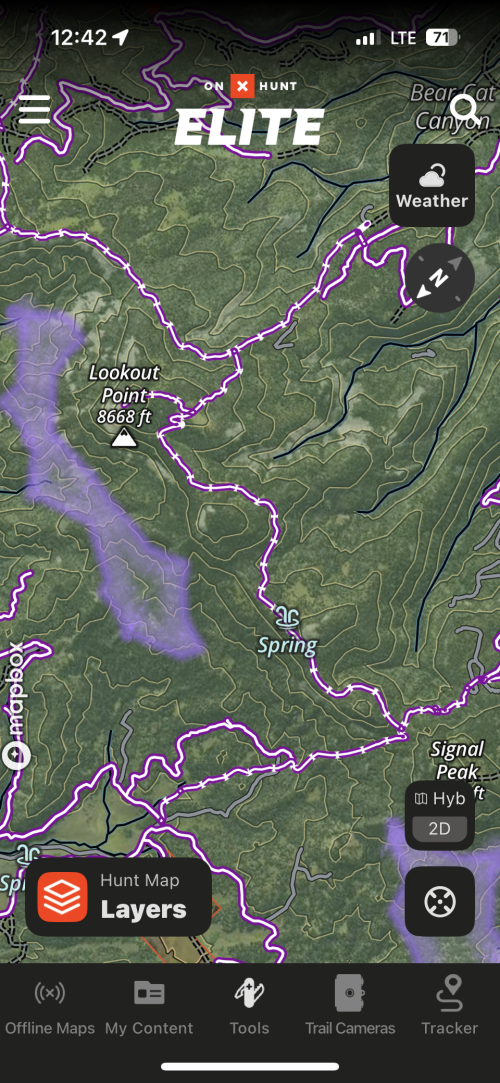
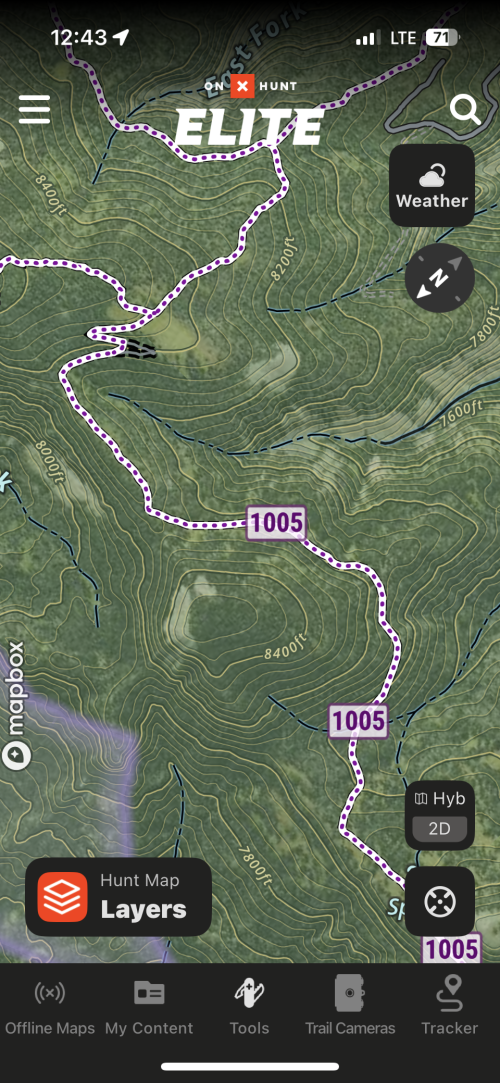
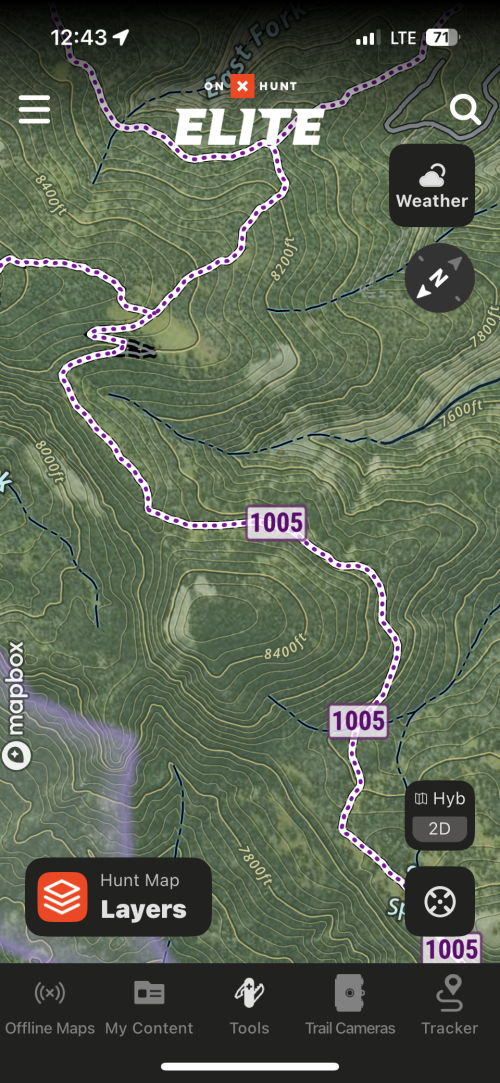
Why does the open roads change with zoom level. I have trails 50 inches and under show as open to high clearance 4x4 when zoomed out but when you zoom in changes to atv, motorcycle trail? I also had a lag in tracks showing mid track, I would check and the dashed line would stop about 1/4 mile from where I was but then fill in later.
onX Hunt
Active member
- Joined
- Jul 22, 2013
- Messages
- 495
We have not been able to replicate the issue you are seeing with the roads on our end. Are you able to send a screenshot of what you're seeing to better help us troubleshoot this for you?Why does the open roads change with zoom level. I have trails 50 inches and under show as open to high clearance 4x4 when zoomed out but when you zoom in changes to atv, motorcycle trail? I also had a lag in tracks showing mid track, I would check and the dashed line would stop about 1/4 mile from where I was but then fill in later.
As for your tracker, it sounds like this might be a lag with your phone GPS, but without more information, it is difficult to know with certainty. If you can email us at [email protected], our customer support team will be able to look a little deeper into this issue for you.
OreIdaElk
Well-known member
OreIdaElk
Well-known member
Similar threads
- Replies
- 17
- Views
- 2K



Latest posts
-

-
 2026 college football 🏈 thread , cuz @jimh406 said so …………
- Latest: Little Big Man MT Chris
-

-
