


Apple to Android

Redmt

Well-known member
Joined
Feb 12, 2021
Messages
4,418
Location
San Antonio Valley California
When I'm sent pictures from an iPhone to my Android they come through fine. After saving them and trying to post them on HT I get an error notice that the extension is not allowed. Not being a tech type, I don't get it. I have a couple really nice pictures I would like to share at times.
 
On android just swipe the side of your hand (karate chop, but like you are a priest doing the sign of cross) across the screen left to right. The phone will generate a screen shot and then you just save to photos. Most android phones will auto generate a screenshot category within your photo gallery so you know where to look if the pic disappears on you.
Try it dont be scared
 
To change your iPhone photos to jpeg going forward, you can do the following:

Open the Settings app, tap on Camera, then select Formats and choose Most Compatible to ensure all new photos are saved as JPEG files. This change will only affect photos taken after the setting is adjusted.
 
To take a screen shot on an Android, at least on MINE, press the power and volume down buttons at the same time. It will be saved to your pictures.
 
On android just swipe the side of your hand (karate chop, but like you are a priest doing the sign of cross) across the screen left to right. The phone will generate a screen shot and then you just save to photos. Most android phones will auto generate a screenshot category within your photo gallery so you know where to look if the pic disappears on you.
Try it dont be scared
That works, too. Now I have 2 ways to do it.
 
To change your photos to jpeg going forward, you can do the following:

Open the Settings app, tap on Camera, then select Formats and choose Most Compatible to ensure all new photos are saved as JPEG files. This change will only affect photos taken after the setting is adjusted.
MF can't figure out a screen shot and ur talking about changing formats!?!?!
 
I have seen that apple is a " doesn't play well with others" company.
The problem fits in with the "RIP garmin" thread.

The file types are driven by the need/desire to send as much info while using the smallest amount of band width. Apple's HEIC are half the size and retain better image quality than JPEG. If you want to sell a premium product for a premium price, like Apple does, you have to stay out front on what every Gen Z uses their phone for, which is taking pictures of themselves. LOL. The file types have changed multiple times over the years. The older you are the more frustrating it is. I can commiserate. Hang in there.
 
The older you are the more frustrating it is. I can commiserate. Hang in there.
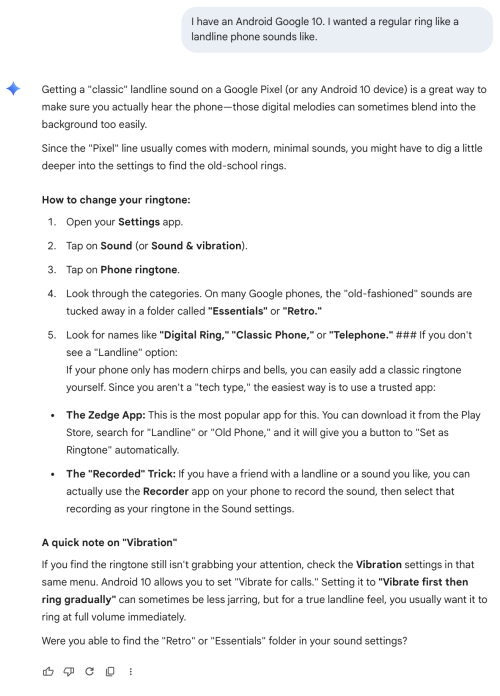
Remember rotary dial, party lines, having to use an operator for overseas calls and waiting for an open line then being limited to a few minutes before being cut off? I wanted a regular ring like a landline phone sounds like. My 15 year old granddaughter didn't know what that sounded like.
 
Remember rotary dial, party lines, having to use an operator for overseas calls and waiting for an open line then being limited to a few minutes before being cut off? I wanted a regular ring like a landline phone sounds like. My 15 year old granddaughter didn't know what that sounded like.
1775409761014.png
 

Forum statistics

Threads
118,792
Messages
2,206,211
Members
38,644
Latest member
BernieBing
Back
Top